
Intuit QuickBooks for Business
Intuit IncBusiness
4.713.84K Reviews
- Version
- 30.15.5+2
- Installs
- 5.00M
- Age Rating
- Everyone
Screenshots
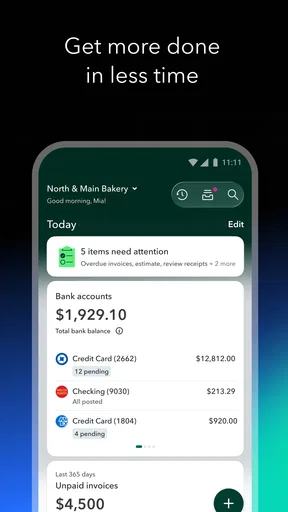
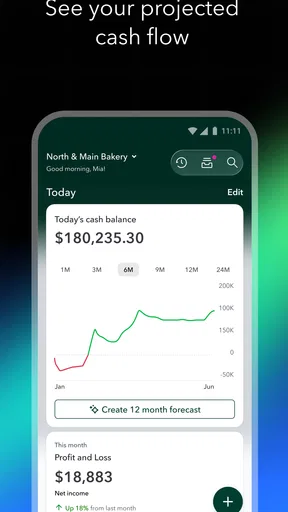
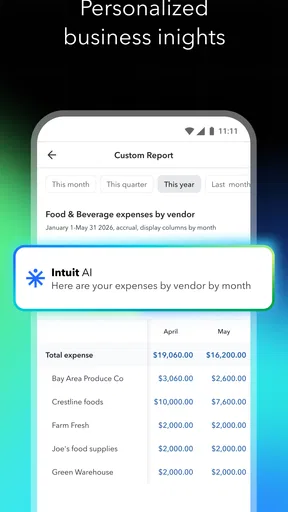
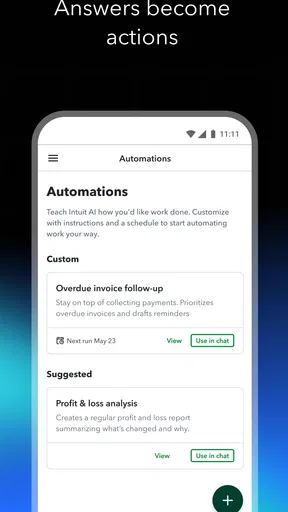
Our Review of Intuit QuickBooks for Business
 Analysis by Appyee
When it comes to managing finances for your business, it’s easy to feel overwhelmed by all the moving parts. That’s where Intuit QuickBooks comes in. If you're like me, trying to keep everything in line from invoices to expenses, having the right tool can make a world of difference. Let's dive into how QuickBooks can help you streamline your business operations.
Who benefits from bringing the books onto a phone?
I see QuickBooks as most useful when bookkeeping is part of a busy working day rather than a separate office task. A self-employed designer, tradesperson, consultant, or small shop owner may need to send an invoice between jobs, check a payment, or keep a receipt from disappearing into a pocket. Being able to handle those small chores close to when they happen can make the end-of-month catch-up less daunting.
Picture a contractor buying supplies on the way to a client. They can photograph the receipt while it is still easy to identify, then add a note about which job it belongs to. Later, when reviewing expenses, that context can help distinguish a reimbursable purchase from a general business cost. My practical tip is to add useful details while the transaction is fresh; an image alone may not explain why the expense matters weeks later.
The app is from Intuit Inc, a developer known for accounting software, and QuickBooks is a business finance app rather than a general-purpose personal budget tracker. It is free to download, carries an Everyone age rating, and has a 4.7 average from around 74,000 ratings. Those figures suggest it is widely used, but they do not tell me whether its paid options fit a particular business, so I would judge it by the workflows I actually need.
The All-in-One Financial Tool
First off, Intuit QuickBooks is like having your very own accounting department right on your phone. Whether you’re running a small startup or managing multiple branches, this app has got your back. You know how juggling spreadsheets can be a nightmare? Well, QuickBooks consolidates everything into one neat platform. You can track expenses, manage cash flow, generate invoices, and even run payroll. It's all here.
What the free download does—and what it doesn’t settle
QuickBooks is listed as free, which makes it easy to try before deciding whether it belongs in your routine. That should not be confused with every business feature being free: in-app purchases range from $0.99 to $420.00 per item. I would check the current options and the exact plan details before relying on a paid capability, especially if it is central to invoicing, payroll, or reporting. The range is broad, so the sensible question is not simply “Is the app free?” but “What will my regular workflow cost?”
That distinction matters for a new business with a tight budget. You can explore the app and see whether its approach suits you, but a download price alone cannot tell you the ongoing cost of the tools you need. I would map out the essentials first—such as sending invoices, recording spending, and reviewing finances—then confirm which are included in the option you intend to use. If all you need is a basic invoice now and then, a simpler tool may be enough; if you want connected bookkeeping, the extra cost may be easier to justify.
Simplified Invoicing and Payments
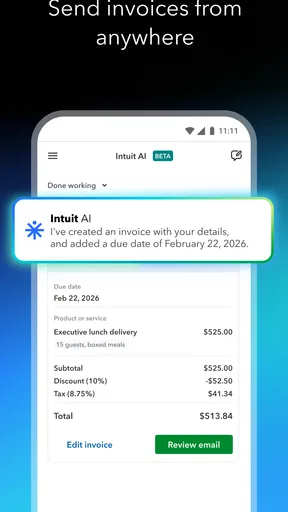
One of my favorite features is the invoicing system. QuickBooks lets you create professional-looking invoices in minutes. You can customize them with your business logo and choose from a variety of templates. Plus, it supports multiple currencies, which is perfect if you're dealing with international clients. Another cool feature is the ability to set up recurring invoices, so you don’t have to worry about sending them manually every month.
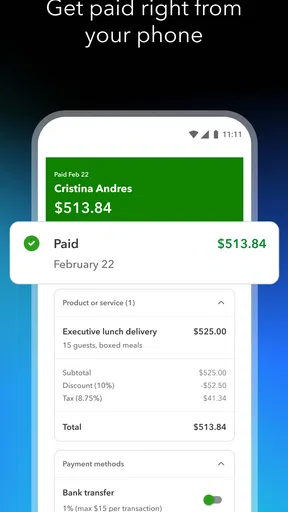
Getting paid is quick and easy too. Clients can pay directly through the invoice using various payment methods. Trust me, it’s a lifesaver when cash flow is tight.
Recurring invoices are particularly helpful when the amount and schedule are genuinely predictable, such as a regular service arrangement. I would still review them when a contract changes or work pauses; automation saves repetitive typing, but it does not replace checking that the bill remains accurate. For occasional or highly customized projects, creating each invoice individually can be the safer habit.
Before choosing an invoicing app, I would also consider how the customer receives and pays the bill, not just how quickly I can create it. QuickBooks brings invoice preparation and business records closer together than a standalone document template does. On the other hand, if my only requirement were a polished one-off invoice and I did not need bookkeeping alongside it, a lightweight invoicing alternative might involve less setup.
Expense Tracking Made Easy
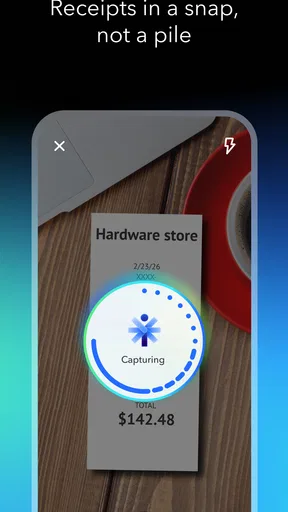
Keeping track of expenses can be a real pain, but QuickBooks simplifies it significantly. Just snap a photo of your receipts, and the app automatically categorizes them for you. It syncs with your bank accounts in real-time, so you’re always up to date. Whether it's office supplies, travel expenses, or client dinners, having everything logged and tracked saves so much time.
The receipt scanner is most useful as a capture step, not as a reason to stop checking entries. I would compare a scanned receipt with the recorded amount and category, then add a short note if the purchase could be ambiguous. A meal, for example, may need context to make clear whether it was a business expense. A few seconds of review can prevent a tidy-looking list from becoming a confusing one later.
Bank syncing can reduce manual entry, but it also changes the kind of attention the books need. Instead of typing every transaction, I would make time to review what has arrived, spot anything that looks unfamiliar, and make sure expenses are assigned sensibly. If I prefer to keep business accounts separate from personal finances, that separation is valuable regardless of which bookkeeping app I choose. I would not treat a connected feed as a substitute for checking statements and records.
Comprehensive Reports and Insights
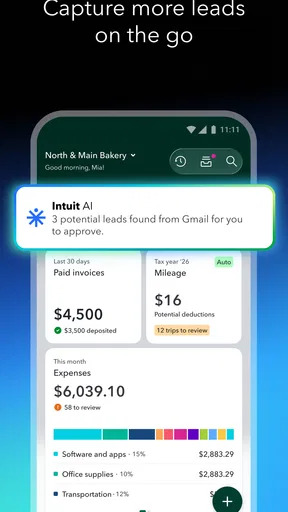
Now, if you're like me and love diving into data, you’ll appreciate the detailed reports QuickBooks provides. You can generate profit and loss statements, balance sheets, and cash flow reports with just a few taps. It’s perfect for spotting trends and making informed financial decisions. Plus, the dashboard gives you a quick overview of your financial health, so you always know where you stand.
A report is only as useful as the bookkeeping behind it. If transactions are missing, miscategorized, or waiting for review, a dashboard can look more certain than the underlying records deserve. I would use the overview to identify questions—such as why costs rose or whether invoices are still unpaid—then inspect the relevant transactions before making a business decision. That approach is more reliable than treating a chart as an explanation by itself.
For a small business owner, the practical value may be less about studying every report and more about having a consistent place to prepare for a conversation with an accountant or review a slow month. A spreadsheet can work well when activity is limited and someone is comfortable maintaining it. QuickBooks becomes more compelling when invoices, expenses, and reporting need to relate to one another rather than live in separate files.
Integrations and Add-Ons
One thing I’ve found super useful is the ability to integrate QuickBooks with other tools I already use. Whether it's syncing with your CRM or linking up with project management software, QuickBooks offers a ton of integrations. There are also add-ons available for inventory management, time tracking, and more, allowing you to tailor the platform to your specific needs.
Integrations can save duplicated work, but I would resist connecting everything simply because an option exists. Start with the task that causes the most repeated entry, then decide whether connecting another tool actually removes that friction. Every extra connection adds another place to check when information does not match. For a very small operation, a simple manual handoff can be clearer than building a network of tools that nobody has time to maintain.
Businesses with stock, staff time, or project-specific costs may have good reason to explore add-ons, but needs vary sharply by trade. Before paying for an extra, I would write down the exact task it should improve and how often that task occurs. If it only solves a rare inconvenience, it may not earn its place in the workflow. For a firm with complex inventory or specialized project management, a dedicated system may also be a better fit than expecting accounting software to do every job.
User-Friendly Interface
Let’s talk about the user experience. QuickBooks is designed with simplicity in mind. The interface is clean, intuitive, and easy to navigate. Even if you’re not a financial expert, you’ll find it straightforward to use. The app guides you through setup and provides helpful tips along the way. Plus, their customer support is top-notch if you ever get stuck.
Version 29.45.9+1 requires Android 10 or later, so I would check the operating system on an older phone before planning to use it there. The app has been available since June 29, 2011, and has passed 5 million installs. That history and reach can offer reassurance that it is an established product, although neither guarantees that the way it works will suit every business or every user.
For someone new to bookkeeping, I would begin with a small, repeatable routine rather than trying to configure every available feature at once. Send a real invoice, capture a few receipts, and review the resulting records. That gives a clearer sense of whether the navigation and terminology make sense for your work. If accounting language itself is the main barrier, a bookkeeper or accountant may be more valuable than another app; the software can organize information, but it cannot make business decisions for you.
Security and Reliability
Security is a big deal when it comes to financial data, and QuickBooks takes it seriously. They use advanced encryption to protect your information, and regular backups ensure your data is safe. It’s comforting to know that your financial info is in good hands.
Whatever bookkeeping tool I use, I would keep my own habits careful: use a secure device, avoid sharing access casually, and review transactions instead of assuming an automated process caught every detail. Those are sensible precautions for financial records in any app. For businesses with strict internal controls or specialized compliance needs, I would check that the product and the chosen setup meet those requirements before moving important records into it.
When another approach may be better
QuickBooks is not automatically the right choice for someone who only needs a personal spending tracker, a basic cashbook, or a one-time invoice. A spreadsheet can be easier to control for a tiny operation with few transactions, while a specialist payroll or inventory system may suit a business whose main challenge is outside everyday bookkeeping. The trade-off is that separate tools can mean more manual reconciliation and less of a unified view.
I would also think about who will maintain the records. If several people need to enter information, agree on a simple process for naming, categorizing, and reviewing transactions before the books become busy. If you are the sole user, a phone-based routine may be enough; if a team needs approvals and carefully defined responsibilities, evaluate whether the available setup supports that way of working before committing.
For a business owner wondering whether a phone is enough, I see the app as a convenient way to keep routine tasks moving, not a reason to ignore the larger bookkeeping picture. Capturing receipts and checking invoices while away from a desk is useful; more involved reviews may still be easier when you can concentrate and see the records clearly. A good fit is a workflow that lets you use the phone for quick actions and reserve focused time for checking the books.
In conclusion, if you’re looking for a reliable and comprehensive financial management tool, QuickBooks is a strong contender. It saves you time, helps you stay organized, and gives you the insights you need to grow your business. Give it a try, and you might just find it’s the solution you’ve been searching for.
My buy-or-skip view
I would try QuickBooks if I run a small business and want invoicing, receipt capture, expense tracking, and financial overviews to sit in one place. Its free download makes an initial look straightforward, while the in-app purchase range means I would verify the cost of the tools I expect to use before building my process around them. The 4.7 average and substantial audience are useful context, not a substitute for checking the fit myself.
I would skip it—or compare it carefully with a simpler option—if my needs were limited to occasional invoices, if I strongly preferred a manual spreadsheet, or if my business depended on specialist workflows that accounting software alone would not cover. For the right small-business routine, though, its strongest appeal is practical: record the details close to when work happens, then use those records to keep a clearer view of money coming in and going out.
Privacy and Permissions
See what permissions an app requests and how it handles your data.
- Calendar
- read calendar events plus confidential information, add or modify calendar events and send email to guests without owners' knowledge
- Contacts
- read your contacts, modify your contacts
- Location
- approximate location (network-based), precise location (GPS and network-based)
- Phone
- directly call phone numbers, read phone status and identity
- Photos/Media/Files
- read the contents of your USB storage, modify or delete the contents of your USB storage
- Storage
- read the contents of your USB storage, modify or delete the contents of your USB storage
- Camera
- take pictures and videos
- Microphone
- record audio
- Wi-Fi connection information
- view Wi-Fi connections
- Device ID & call information
- read phone status and identity
- Other
- view network connections, pair with Bluetooth devices, access Bluetooth settings, connect and disconnect from Wi-Fi, full network access, change your audio settings, control Near Field Communication, run at startup, reorder running apps, control vibration, prevent device from sleeping, read Google service configuration
Verdict
Strengths of Intuit QuickBooks for Business
- User-friendly interface for all levels.
- Seamlessly integrates with banking apps.
- Offers robust reporting features.
- Excellent customer support available.
- Cloud-based for easy access anywhere.
Limitations of Intuit QuickBooks for Business
- Subscription can be expensive for small businesses.
- Occasional syncing issues reported.
- Limited customization for invoices.
- Mobile app lacks some desktop features.
- Steep learning curve for advanced tools.
Other Releases by Intuit Inc
View All
TurboTax: File Your Tax Return
Finance4.0

QuickBooks Workforce
Productivity4.7
Similar Picks in This Category
View All
LinkedIn: Community & Network
LinkedIn3.8

Zoom Workplace
zoom.com4.1

Microsoft Teams
Microsoft Corporation4.6

Meta Business Suite
Meta Platforms, Inc.4.6

Webex Meetings
Cisco Systems, Inc.4.5

TeamViewer Remote Control
TeamViewer4.4
Frequently Asked Questions
What is Intuit QuickBooks for Business?
Intuit QuickBooks for Business is a comprehensive accounting software designed to help small and medium-sized businesses manage their finances efficiently. The app offers features such as invoicing, payroll, expense tracking, and financial reporting, making it easier for businesses to maintain accurate records and streamline their financial operations.
Is QuickBooks suitable for my business size and industry?
QuickBooks is highly versatile and caters to various business sizes and industries. Whether you own a small retail store or run a medium-sized consultancy firm, QuickBooks offers customizable solutions. Its features can be tailored to meet specific industry needs, including retail, construction, and non-profit organizations.
What are the key features of QuickBooks that benefit businesses?
QuickBooks offers several key features that benefit businesses, such as automated invoicing, expense and income tracking, payroll management, and comprehensive financial reporting. Additionally, its cloud-based system allows for secure access from anywhere, providing businesses with flexibility and real-time financial insights.
How secure is my financial data with QuickBooks?
QuickBooks prioritizes security by employing advanced encryption technologies to protect your financial data. Regular security updates and multi-factor authentication add layers of protection. Additionally, being cloud-based ensures data is backed up automatically, minimizing the risk of data loss due to hardware failures.
Can QuickBooks integrate with other business tools?
Yes, QuickBooks is designed to integrate seamlessly with a wide range of business tools, enhancing its functionality. It can connect with applications such as PayPal, Shopify, and Square, allowing you to synchronize data, streamline workflows, and maintain consistency across various platforms, thus improving overall efficiency.
